
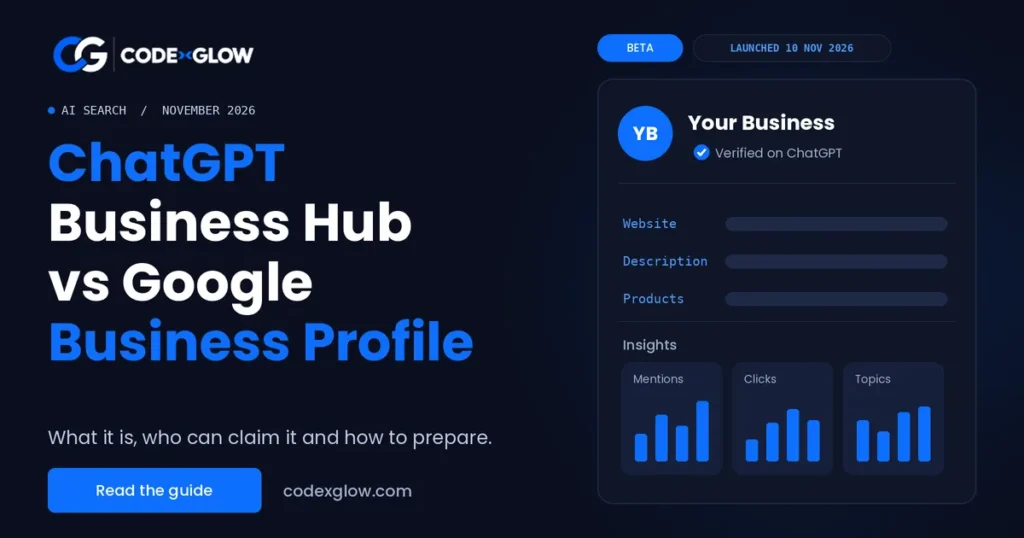
ChatGPT Business Hub is OpenAI’s new business profile tool, launched in beta on 10 November 2026. Eligible businesses can claim a profile in ChatGPT, manage details such as their website, description, products and services, and see mentions, website clicks and discovery topics. It is free and works much like Google Business Profile, but it does not guarantee better visibility. If you are eligible, claim it, and keep your website and Google Business Profile accurate and consistent.
People now ask AI who to trust before they ever open a map. BrightLocal’s 2026 research found that generative AI tools rose from 6% to 45% as a source of local business recommendations for consumers over the year, and OpenAI says search volume on ChatGPT is now about one-fifth the size of Google’s.
On 10 November 2026 OpenAI launched Businesses in ChatGPT, with a Business Hub where companies can claim a profile. Two days later, on 12 November, Google made Gemini 4 Hydrogen the default model in AI Mode for all users worldwide. AI search is changing on both sides, so here is what it means for your business.
What is ChatGPT Business Hub?
Business Hub (currently in beta) lets owners or authorized representatives claim their business in ChatGPT and manage how it appears. Verified businesses get a blue check.
- Profile details: update your website, hours, location and description, and add products and services. If you sell online, you can list products with prices and availability.
- Insights: see how often ChatGPT mentions your business, how many people click through to your website and which topics lead to those mentions.
- Business Agents: an AI assistant that answers customer questions using your product and policy information. For now it is limited to eligible e-commerce and online service businesses in the US.
OpenAI has also said it may create and display a business listing whether or not you claim it. Claiming gives you a way to check and correct what ChatGPT says about you.
Who can claim it right now?
- Online businesses: eligible online businesses can claim a profile wherever ChatGPT is available.
- Local stores and restaurants: for now, only an existing US listing can be claimed.
- Not sure? Sign in, open Business Hub and search for your business. If it does not appear, you are probably not eligible yet.
Availability depends on your location and business type, and it is likely to change while the feature is in beta.
ChatGPT Business Hub vs Google Business Profile
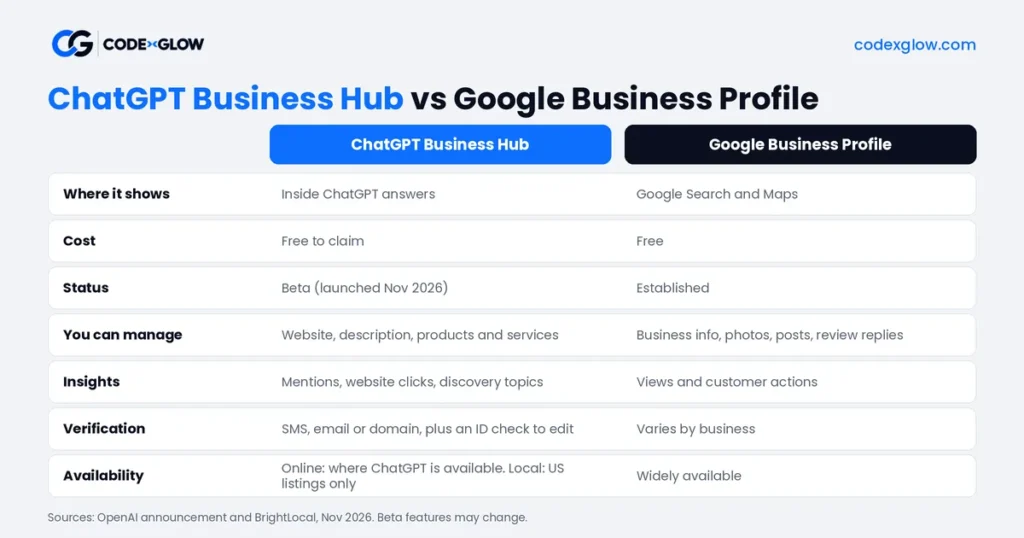
The biggest difference is maturity. Google Business Profile has years of data, reviews and Maps behind it. BrightLocal’s research found that Google used Google Business Profile as a source for almost every business it returned in AI Overviews and AI Mode, while ChatGPT drew on Yelp, directories and company websites. BrightLocal expects ChatGPT may start leaning on Business Hub, but that is its view, not a confirmed change.
The two are not either-or. Treat Business Hub as an addition to Google Business Profile, not a replacement.
How to claim your ChatGPT business profile
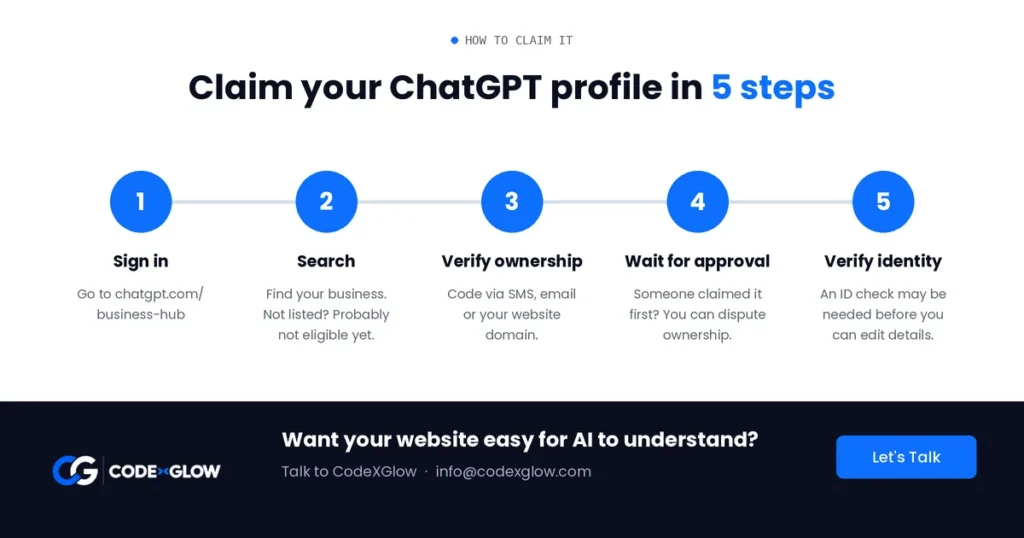
- Sign in to ChatGPT and go to chatgpt.com/business-hub.
- Search for your business. If it does not appear, you are likely not eligible yet.
- Verify ownership with a code sent by SMS, email or your website domain.
- Wait for approval. If someone else claimed it first, you can dispute ownership.
- Complete an identity check. This may require a government ID and business registration details before you can edit your profile.
OpenAI explains the process on its help page, Setting up your business on ChatGPT. Check it for the latest steps, because the beta rules may change.
How to prepare your business and website
A profile only repeats what you tell it, and AI systems also read your website. These steps help in ChatGPT, Google and anywhere else people ask about you.
- Make the basics identical everywhere. Use the same business name, website, description, services and contact details on your site, Google Business Profile, Bing Places and social profiles.
- Write a plain-language description. One short paragraph on who you serve, what you do and where.
- List products and services clearly. Keep prices and availability accurate on your site, and in your profile if you sell online. If you run an online store, see our Black Friday website checklist.
- Add structured data. Use Organization (and LocalBusiness if you serve a local area), Product and Offer, and FAQ markup so machines can read your details.
- Publish pages AI can quote. Clear About, Services, Pricing, FAQ and Contact pages with short, factual answers. Our guide to AI search optimization (GEO) covers this in more detail.
- Keep Google Business Profile current. Update hours and photos, post updates and reply to reviews.
- Check what AI says about you. Once a month, ask ChatGPT and Google AI Mode a few questions a customer would ask about your business, and note anything wrong.
Google’s AI search is changing too
On 12 November 2026 Google made Gemini 4 Hydrogen the default model in AI Mode for all users worldwide, and it also powers the hardest questions in AI Overviews. Google says answers will be more visual, with more images, comparison tables and interactive tools, and better at multi-part questions. The change arrived while Google’s November 2026 core update, which began on 10 November, was still rolling out.
The takeaway is the same as for Business Hub: clear, structured and consistent information about your business gives AI systems the best chance of describing you correctly.
Should you claim your ChatGPT business profile?
If you are eligible, yes. It is free, it takes a few minutes, and it gives you control over what ChatGPT knows about your business plus click data you cannot get elsewhere.
Keep your expectations realistic:
- It is in beta, and OpenAI says creating a profile does not guarantee better placement in ChatGPT results.
- Google Business Profile still matters most for many local customers. One analysis of Indian search traffic estimated that Google handled about 98% of search referrals in October 2026.
- The identity check may ask for a government ID and business details, so make sure the person doing it is authorized to represent the business.
Frequently asked questions
What is ChatGPT Business Hub? ChatGPT Business Hub is OpenAI’s business profile tool, launched in beta in November 2026. Eligible businesses can claim a profile in ChatGPT, manage details such as their website, description, products and services, and see insights such as mentions, website clicks and discovery topics.
Is ChatGPT Business Hub free? Yes. Claiming a ChatGPT business profile is free. Business Agents were reported to be free at launch, with possible charges later.
Who can claim a ChatGPT business profile? Eligible online businesses can claim a profile wherever ChatGPT is available. Local stores and restaurants can currently claim only an existing US listing. If you search for your business in Business Hub and it does not appear, you are probably not eligible yet.
How do I claim my business on ChatGPT? Sign in to ChatGPT and go to chatgpt.com/business-hub, search for your business, verify ownership with a code sent by SMS, email or your website domain, wait for approval, then complete an identity check to edit your profile.
Will a ChatGPT business profile improve my visibility? Not automatically. OpenAI says creating a profile does not guarantee that a business will show up better in ChatGPT search results, although it gives you a way to correct and control the information ChatGPT holds about you.
Does ChatGPT Business Hub replace Google Business Profile? No. They work side by side. Google Business Profile still powers local discovery in Google Search and Maps and is a key source for Google’s AI answers, so keep both profiles accurate and consistent with your website.
Want your website to be easy for AI to understand?
CodeXGlow builds websites and helps businesses and agencies get found in Google and AI search, from clear site structure and structured data to content and digital marketing. Send us your website and we will look at how clearly it describes your business. Email info@codexglow.com or contact us.