

AI search optimization is the practice of structuring your website so AI answer engines, such as Google’s AI Overviews, ChatGPT and Perplexity, can easily find, understand and cite your content. It builds on classic SEO with answer-first writing, semantic HTML, fast Core Web Vitals and visible expertise.
Search has shifted from ten blue links to synthesized answers. Many people now read an AI-generated summary first and click later, if at all. If your pages are hard to parse, slow to load or light on real expertise, competitors earn the citation and you lose visibility you may already have worked hard to build.
The modern approach is called Generative Engine Optimization (GEO). One honest caveat before we start: Google has said its AI features are built on its standard Search systems and do not need special AI markup. So a strong GEO strategy is mostly excellent SEO fundamentals, executed with extra clarity. The steps below show you how.
Key Takeaways
- Lead every section with a short, direct answer (about 40 to 60 words), then add detail.
- Use semantic HTML5 and accurate JSON-LD structured data so machines can parse your page.
- Hit Google’s Core Web Vitals targets: LCP under 2.5 seconds, INP under 200 milliseconds and CLS under 0.1.
- Show real experience with named authors, original data and regularly updated content.
- Make sure crawlers can reach your content. Google does not require special “AI files.”
What Is Generative Engine Optimization (GEO)?
Generative Engine Optimization (GEO) is the process of making your content easy for AI systems to retrieve, understand and cite when they generate answers. Where SEO aims for rankings and clicks, GEO also aims for citations and brand mentions inside AI-written responses.
The two overlap heavily. Crawlable pages, helpful content and a good user experience help in both. GEO adds extra attention to how extractable your writing is: clear definitions, one idea per paragraph and facts that are easy to verify. You will also hear this called answer engine optimization (AEO), and the practical steps are the same.
How to Structure Content for AI Answer Engines
Place a direct answer of roughly 40 to 60 words under each main heading, then expand with detail, examples and sources. Pair it with semantic HTML and accurate structured data so AI answer engines can extract a clean, trustworthy passage.
- Write answer-first blocks. Start each section with a short definition or conclusion. This is a practitioner guideline, not an official rule, but it makes passages easy to quote.
- Use question-style headings. Headings such as “What is GEO?” mirror how people phrase their searches.
- Use semantic HTML5. Structure pages with <header>, <nav>, <main>, <article>, <section>, <aside> and <footer>, plus one H1 and a logical H2 to H3 hierarchy. Most modern WordPress themes already output these, and you can confirm by viewing your page source.
- Add JSON-LD structured data. Article, Organization and, where genuinely relevant, FAQPage schema give machines unambiguous context. Keep it identical to the visible content and test it with Google’s Rich Results Test. Structured data improves understanding, but it does not guarantee citations.
- Keep key content in HTML. Some AI crawlers do not run JavaScript, so important text should sit in the server-rendered HTML rather than being injected after the page loads.
- Do not block the crawlers you want. Check robots.txt, your security plugin and your CDN settings so search crawlers such as Googlebot, OAI-SearchBot and PerplexityBot can reach your pages.
Prioritize Website Speed and Core Web Vitals
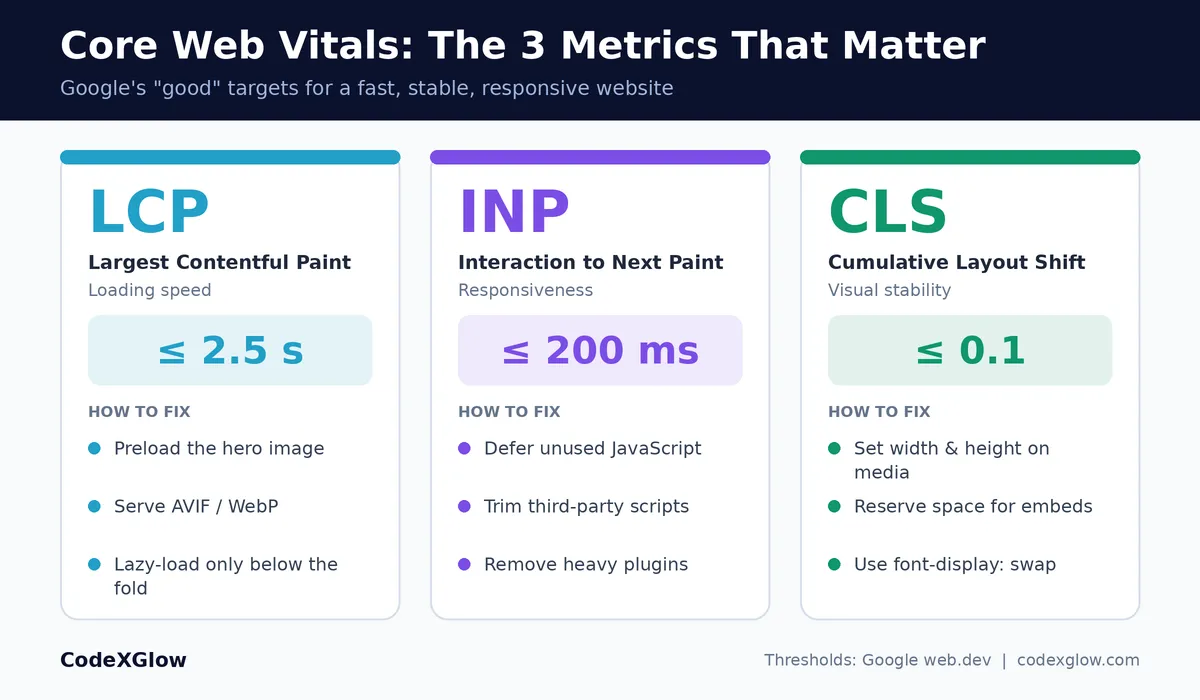
Core Web Vitals measure real-world loading, responsiveness and visual stability. Google’s “good” targets are LCP under 2.5 seconds, INP under 200 milliseconds and CLS under 0.1. Fast, stable pages are easier to crawl and far more likely to keep visitors engaged.
Core Web Vitals are a lightweight ranking signal, but the bigger payoff is user experience: faster pages lose fewer visitors and convert better. Here is what each metric means and how to improve it.
| Metric | What it measures | Good target | Practical fix |
| LCP (Largest Contentful Paint) | How fast the main content loads | 2.5 seconds or less | Serve images in AVIF or WebP, preload the hero image and lazy-load only images below the fold. Never lazy-load your top image. |
| INP (Interaction to Next Paint) | How quickly the page responds to taps and clicks | 200 ms or less | Defer unused JavaScript, cut third-party scripts and remove heavy plugins. |
| CLS (Cumulative Layout Shift) | How much the layout jumps while loading | 0.1 or less | Set width and height on images, video and embeds, and reserve space for ads. |
WordPress Speed Optimization Checklist
- Choose reliable hosting with a current PHP version and server-side caching.
- Install one caching plugin (for example WP Rocket or LiteSpeed Cache) and configure it properly.
- Compress images and convert them to WebP or AVIF with an image optimization plugin.
- Delete unused plugins and themes, and replace heavy ones with lighter options.
- Use a lightweight theme and a CDN for static files.
- Test with PageSpeed Insights and monitor the Core Web Vitals report in Google Search Console.
Build E-E-A-T: Show Real Experience and Trust
E-E-A-T stands for Experience, Expertise, Authoritativeness and Trust. It is a quality framework used by Google’s raters rather than a single ranking switch, but the signals behind it (real authors, original evidence and accurate content) make your pages worth citing.
- Show real authors. Add a bio with credentials and links to professional profiles on every post.
- Publish original evidence. Share case studies, test results and benchmarks that scrapers cannot copy.
- Cite and link sources. Reference primary sources so your claims are verifiable.
- Keep content fresh. Review evergreen guides regularly and show a visible “last updated” date.
Make trust pages obvious. Keep your About, Contact, Privacy Policy and Terms pages complete, accurate and easy to find.
AI Search Optimization Checklist
- Every H2 opens with a direct answer of about 40 to 60 words.
- One H1, logical H2 and H3 headings, and semantic HTML5 tags.
- Article schema (and FAQPage where relevant) passes the Rich Results Test, with no duplicate schema from plugins.
- LCP 2.5 s or less, INP 200 ms or less and CLS 0.1 or less on mobile.
- Key text is present in server-rendered HTML.
- Googlebot and other search crawlers are not blocked.
- A named author bio, publish date and updated date are visible.
- Internal links to related guides and outbound links to authoritative sources.
Frequently Asked Questions
What is AI search optimization?
AI search optimization is the practice of making your website easy for AI answer engines to crawl, understand and cite. It combines answer-first content, semantic HTML, structured data, fast Core Web Vitals and strong E-E-A-T signals.
Is GEO different from SEO?
GEO builds on SEO rather than replacing it. The fundamentals are the same: crawlable, helpful, fast pages. GEO adds extra focus on clear, extractable answers and on earning citations and mentions in AI-generated responses, not just rankings.
Do I need special schema or an llms.txt file?
No. Google has said its AI features rely on standard Search practices and that special AI-specific markup or files are not required. Accurate Article or FAQPage schema still helps clarity, but it is not a shortcut to being cited.
Does site speed affect AI search visibility?
Indirectly, yes. Fast pages are easier to crawl and give visitors a better experience. Core Web Vitals are a lightweight Google ranking signal, and a page that ranks and loads well is more likely to be surfaced and cited.
How long does it take to see results?
Technical fixes such as speed and structure can show effects within weeks. Authority and citations build over months, and AI citations can change from one answer to the next, so track trends rather than single results.
Conclusion
Thriving in modern search takes more than stuffing in high-volume keywords. Lead with clear answers, build clean semantic HTML, add accurate structured data, pass Core Web Vitals and prove real expertise. Do these consistently and your site stays discoverable in both traditional search and AI answer engines.
Want a faster, AI-ready website? Request a free speed and SEO audit from CodeXGlow.
Further reading
- Google Search Central: AI features and your website (https://developers.google.com/search/docs/appearance/ai-features)
- web.dev: Core Web Vitals (https://web.dev/articles/vitals)
- PageSpeed Insights (https://pagespeed.web.dev/)
- Google Rich Results Test (https://search.google.com/test/rich-results)